OrderService
ValueCheck Title Automation Web Service
This Web Service is the client interface to ValueCheck's Title Automation Service. It will allow new orders to be posted, indicate the status of an order, and download docs and details about an order.
This production service is found at:
https://www.valuecheckonline.com/TA_WS/OrderService.asmx
This Beta/Demo version of this service is found at:
https://beta.valuecheckonline.com/TA_WS/OrderService.asmx
Below is the general workflow and avaiable methods from this Web Service. Click on the method box to go to the docs for that method.
| Customer's Processing | ValueCheck's Processing | |||||
| ===> | ||||||
| Pre Processing | ||||||
| New Order | New Order | |||||
-- OR -- |
||||||
-- OR -- |
||||||
| W | ||||||
| Processing | O | Processing | ||||
| R | ||||||
| K | ||||||
| F | ||||||
| L | ||||||
| O | ||||||
| W | ||||||
| Ready | Ready | |||||
| | | ||||||
| | | ||||||
| V | ||||||
| <=== | ||||||
The following operations are supported. For a formal definition, please review the Service Description.
-
Alerts
Return Information about site availbilites and alerts
- Arguments:
AdminID Admin Identifier provided by ValueCheck. UserID User Identifier provided by ValueCheck. Password Password provided by ValueCheck. VCAppID Application Identifier provided by ValueCheck.
- Return:
StsDate Timestamp of the result Sts Value Name Description 0 OKAll went well. -1 ResearchProblem There is a problem with processing of the alerts. Description Will contain a textual description of the Status. See above. Xml Xml of the current alerts and statuses
-
AvailableImages
Obsolete. Use AvailableImages2 instead.
-
AvailableImages2
This method allows a customer to get a list of images that can be downloaded. See GetImage2 for how to download a image.
- Arguments:
AdminID Admin Identifier provided by ValueCheck. UserID User Identifier provided by ValueCheck. Password Password provided by ValueCheck. VCAppID Application Identifier provided by ValueCheck. VCClientID Customer Identifier provided by ValueCheck. AccountNum Customer supplied Identifier to indicate individual user or Account. OrderNum Unique Order Number assigned to this order. Submitted Timestamp of this request.
- Return:
AccountNumber The Account Number given in the request. OrderNumber The Order Number given in the request. StsDate Timestamp of the result Sts Value Description 0 All went well. -1 Indication that something went wrong. The description fields will have more info. Description Will contain a textual description of the Status. Will often contain more details when the status is an error. Images 0-N List of image information records. Each record has the following fields: Field DDescription Category - The Type of Image. One of the following:
- Vesting
- Encumbrance
- Bankruptcy
- Judgement
- Tax
- TaxCert
- ParcelMap
- GISMap
- Profile
- GIGap
- PIChain
- GIChain
- ExamNotes
- Starter
- DateDown
- Cover
- PrelimReport
Must be configured; Contact ValueCheck. - FinalProduct
Must be configured; Contact ValueCheck. - SearchPackage
Must be configured; Contact ValueCheck.
ImageType If the Category is a Vesting, Encumbrance, Bankruptcy, or Judgment this field indicates the Type of image as specified by the source title System. Id How to Identify this image when requesting for it. Format - The native storage format of the document. May be:
- GIF
- TIF
- JPG
- PNG
- HTM
- PDF
- TXT
- XML
Pages if available, , the number of pages contained with the image.
-
DateDownReady
Used For Example only - non functional on this site.
When configured by ValueCheck to do so, this customer implemented method will be called by the ValueCheck Title Automation Systems when a Date Down Reqeust has been completed.
Notes on usage:
- It must be implemented by the customer as an HTTP-SOAP Web Service.
- ValueCheck must enable this.
- Each Date Down Reqeust that needs notification must have the 'ClientWebServiceAddress' set to the URL of the Web Service that implements this method at the time the operation OrderDateDown is called.
- Arguments:
Argument Description order The Order identifier.
Will contain the same information as what was posted with the Order without the authentication credentials.VCAppID Application Identifier provided by ValueCheck. VCClientID Customer Identifier provided by ValueCheck. AccountNum Customer supplied Identifier to indicate individual user or Account. OrderNum Unique Order Number assigned to this order. Submitted Timestamp of this request. Sts Status Value Description 1 NoDocs Date Down was performed and no new postings were found. 2 FoundDocs Date Down was performed and new postings were found. -1 NotFound Unable to find the Order to Date Down -2 NotSupported Date Down are not supported in the requested State/County/TitleSystem. -4 NotAuthorized Client not authorized for Date Downs. statusInfo More infomation about the order. Most likely will contain a textual description about a problem. DateDownXml More information about the order in a structure customized for the customer if neeeded. Currently will return this content: <DateDownInfo> <EffectiveDate>yyyy-MM-dd</EffectiveDate> If not known then the content will be empty <SearchSinceDate>yyyy-MM-dd</SearchSinceDate> If not known then the content will be empty <DocId>DocId</DocId> The DocId for the Date Down Results. Content will be empty if a data down could not be preformed use the DocID in the call to GetImage2 to retrieve the image of the date down. <NumDocsFound>int</NumDocsFound> Number of posted documents discovered in the date down. <Message>string</Message> Human readable message about the results of the datedown </DateDownInfo>
- Returns: The customer returns a Status Object that contains:
Return Description AccountNum Must be the same as sent in the order. OrderNum Must be the same as sent in the order. Sts Zero to acknowledge the status update. Non-Zero to indicate a problem. Description Textual information about the Sts. StsDate TimeStamp of response.
-
FullOrderDetail
Docs coming soon.... (make that eventually)
-
GetImage
Obsolete. Use GetImage2 instead.
-
GetImage2
This method allows a customer to download a particular image. See AvailableImages2 for how to get a list of images that may be downloaded.
- Arguments:
AdminID Admin Identifier provided by ValueCheck. UserID User Identifier provided by ValueCheck. Password Password provided by ValueCheck. VCAppID Application Identifier provided by ValueCheck. VCClientID Customer Identifier provided by ValueCheck. AccountNum Customer supplied Identifier to indicate individual user or Account. OrderNum Unique Order Number assigned to this order. Submitted Timestamp of this request.
- Return:
AccountNumber The Account Number given in the request. OrderNumber The Order Number given in the request. StsDate Timestamp of the result Sts Value Description 0 All went well. -1 Indication that something went wrong. The description fields will have more info. -1 NotFound Problem obtaining the image. -3 DoesNotExist image does not exist. -4 NotAuthorized Client not authorized to obtain image. Description Will contain a textual description of the Status. Will often contain more details when the status is an error. Category - The Type of Image requested. One of the following:
- Vesting
- Encumbrance
- Bankruptcy
- Judgement
- Tax
- TaxCert
- ParcelMap
- GISMap
- Profile
- GIGap
- PIChain
- GIChain
- ExamNotes
- Starter
- DateDown
- Cover
- PrelimReport
Must be configured; Contact ValueCheck. - FinalProduct
Must be configured; Contact ValueCheck. - SearchPackage
Must be configured; Contact ValueCheck.
Id The Identifier of the image. Format The targeted format of the Image. It the target format is different that the native format, the Image will be converted from the native storage format to the targeted format if possible.
- Targeted format may be:
- Support conversions (Native -> Target(s)):
- GIF
- TIF
- JPG
- PNG
- HTM
- PDF
- TXT
- XML
- GIF -> PDF TIF JPG PNG
- TIF -> PDF JPG PNG GIF
- JPG -> PDF TIF PNG GIF
- PNG -> PDF TIF JPG GIF
- HTM -> PDF TIF JPG PNG GIF
- PDF -> TIF JPG PNG GIF
- TXT -> PDF TIF JPG PNG GIF
- XML -> PDF TIF JPG PNG GIF
Page If 0 or less then all available pages are returned. If applicable, a page > 0 indicates which page # of the image to download. Doc - If found, the Base64 encoded string of the image. Empty if not found
-
OrderDateDown
Order a Date Down (File Update/Bring To Date) for an order that has previously been created.
ValueCheck will supply AdminId, UserName, Password, VCAppId, and VCClientID.
The details of the order can be sent in a custom XML fragment (ValueCheck will need to write a custom parser) or the default ValueCheck Schema can be used.
- Arguments:
AdminID Admin Identifier provided by ValueCheck. UserID User Identifier provided by ValueCheck. Password Password provided by ValueCheck. VCAppID Application Identifier provided by ValueCheck. VCClientID Customer Identifier provided by ValueCheck. AccountNum Customer supplied Identifier to indicate individual user or Account. OrderNum Unique Order Number assigned to this order. Submitted Timestamp of this request. Xml Details of the Request. See below.
- The Xml argument contains details needed to complete the Date Down This embedded xml must conform to this sample:
Name Description Required PolicyType Policy Type Yes. Consult with ValueCheck for valid values. ClientWebServiceAddress The URL of the Customer’s Web Service for the ValueCheck Order Processing Engine to post DataDown Ready/Results notifications. A string of this format is expected: https://www.yourcompany.com/TA_WS/OrderService.asmx
The Client's Web Service should implement the method DateDownReady that is described later in this document.Only called if configured at ValueCheck to notify that the Date Down is completed. ClientOrderedBy Further information indicating who is requesting the order (may be overwritten for Officer Code processing by ValueCheck) PropState State of the Order best if supplied - consult ValueCheck for your requirements PropCounty County of the Order best if supplied - consult ValueCheck for your requirements PropPin Parcel number or APN of the Property No; but very helpful SpecialDocDate Date of the last Date Down No. But if supplied best format is YYYY-MM-DD ClientEmail Email to send custom response for problems or Date Down results that have discovered new documents No. Consult ValueCheck for your requirements CloserEmail Email to send custom response of sucessful Date Down results (no problems and no new documents found) No. Consult ValueCheck for your requirements
Example of the default Xml for posting a Date Down Order:
<TitleOrder>
  <DateDown VCAppId='int' VCClientID='int' AccountNum='string' OrderNum='string'>

    <PolicyType>string</PolicyType>

    <PropState>string</PropState>
    <PropCounty>string</PropCounty>
    <PropPin>string</PropPin>

    <ClientWebServiceAddress></ClientWebServiceAddress>
    <ClientOrderedBy>string</ClientOrderedBy>
    <ClientEmail>string</ClientEmail>

    <SpecialDocDate>string</SpecialDocDate>
  </DateDown>
</TitleOrder>
- Return:
AccountNumber The Account Number given in the request. OrderNumber The Order Number given in the request. StsDate Timestamp of the result. Sts Value Description 0 Data Down Requested. -1 Something went wrong. Description A textual description of the an error status. OK if all went well.
-
OrderDelete
Delete an exsting Order
Notes on usage:
- None.
- Arguments:
AdminID Admin Identifier provided by ValueCheck. UserID User Identifier provided by ValueCheck. Password Password provided by ValueCheck. VCAppID Application Identifier provided by ValueCheck. VCClientID Customer Identifier provided by ValueCheck. AccountNum Customer supplied Identifier to indicate individual user or Account. OrderNum Unique Order Number assigned to this order. Submitted Timestamp of this request.
- Return:
AccountNumber The Account Number given in the request. OrderNumber The Order Number given in the request. StsDate Timestamp of the result. Sts Value Description 0 Order was deleted. 1 Order does not exists. -1 Something went wrong. Description A textual description of the an error status. OK if all went well.
-
OrderDeleted
Used For Example only - non functional on this site.
-
OrderDocument
Obsolete. Please do not use.
-
OrderDocumentReceived
Obsolete. Please do not use.
-
OrderQuery
Obsolete. Please do not use.
-
OrderReady
Used For Example only - non functional on this site.
-
OrderStatusQuery
This method returns information about the processing status of an order.
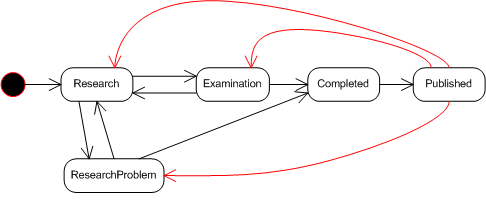
Below are the stages that an order moves through.
- Arguments:
AdminID Admin Identifier provided by ValueCheck. UserID User Identifier provided by ValueCheck. Password Password provided by ValueCheck. VCAppID Application Identifier provided by ValueCheck. VCClientID Customer Identifier provided by ValueCheck. AccountNum Customer supplied Identifier to indicate individual user or Account. OrderNum Unique Order Number assigned to this order. Submitted Timestamp of this request.
- Return:
AccountNumber The Account Number given in the request. OrderNumber The Order Number given in the request. StsDate Timestamp of the result Sts Status Value Description 1 Research Order is now in research/processing at Valuecheck. 2 Examination Order is done with research and is ready for customer examination. 3 Completed Order examination is completed and the prepared documents and images are being published to the customer. 4 Published Order documents and images are now published. -1 ResearchProblem There is a problem with researching the order. Most likely the customer needs to supply more information. -2 UnknownProblem There is a problem with the order. Most likley ValueCheck will need to intervene. -3 DoesNotExist The order does not exist or was deleted. -4 NotAuthorized Cannot authorization access. Check the values for AdminID, UserID, Password and VCAppID Description Will contain a textual description of the Status. Will often contain more details when the status is an error. OrderInfoXml Customize xml about the order base on the current status. Contact ValueCheck for more information and setup.
-
OrderStatusUpdate
Used For Example only - non functional on this site.
When configured by ValueCheck to do so, this customer implemented method will be called by the ValueCheck Title Automation Systems when an order has moved to a different stage.
Below are the stages that an order moves through. Notifications will be sent as indicated by the arrows.
Notes on usage:
- It must be implemented by the customer as an HTTP-SOAP Web Service.
- ValueCheck must enable which events will trigger the calling of this method based on the AppId.
- Each order that needs notification must have the 'ClientWebServiceAddress' set to the URL of the Web Service that implements this method when it is posted to ValueCheck.
- The events that can trigger the calling of this method are:
Event Description Status Value Description 1 Research Order is now in research/processing at Valuecheck. 2 Examination Order is done with research and is ready for customer examination. 3 Completed Order examination is completed and the prepared documents and images are being published to the customer. 4 Published Order documents and images are now published. -1 ResearchProblem There is a problem with researching the order. Most likely the customer needs to supply more information. -2 UnknownProblem There is a problem with the order. Most likley ValueCheck will need to intervene.
- Arguments:
Argument Description order The Order identifier.
Will contain the same information as what was posted with the Order without the authentication credentials.VCAppID Application Identifier provided by ValueCheck. VCClientID Customer Identifier provided by ValueCheck. AccountNum Customer supplied Identifier to indicate individual user or Account. OrderNum Unique Order Number assigned to this order. Submitted Timestamp of this request. status The status of the order. Will be one of the events described above. statusInfo More infomation about the order. Most likely will contain a textual description about a problem. orderInfoXml More information about the order in a structure customized for the customer if neeeded.
- Returns: The customer returns a Status Object that contains:
Return Description AccountNum Must be the same as sent in the order. OrderNum Must be the same as sent in the order. Sts Zero to acknowledge the status update. Non-Zero to indicate a problem. Description Textual information about the Sts. StsDate TimeStamp of response.
-
OrderTaxCert
Order a Tax Cert for a particular State/County/Pin(or APN) an attach it to an existing order.
STILL IN DEVELOPMENT
Notes on usage:
- If the Order does not exists, one will be created.
- Arguments:
AdminID Admin Identifier provided by ValueCheck. UserID User Identifier provided by ValueCheck. Password Password provided by ValueCheck. VCAppID Application Identifier provided by ValueCheck. VCClientID Customer Identifier provided by ValueCheck. AccountNum Customer supplied Identifier to indicate individual user or Account. OrderNum Unique Order Number assigned to this order. Submitted Timestamp of this request. Xml Details of the Request. See below.
- The Xml argument contains the State, County and Pin (APN) of the Property for which a Tax Cert is ordered. This embedded xml must conform to this sample:
<TitleOrder>
  <TaxCert VCAppId='int' VCClientID='int' AccountNum='string' OrderNum='string'>
    <ClientWebServiceAddress>Url</ClientWebServiceAddress>
    <PropState></PropState>
    <PropCounty></PropCounty>
    <PropPin></PropPin>
  </TaxCert>
</TitleOrder>
- Return:
AccountNumber The Account Number given in the request. OrderNumber The Order Number given in the request. StsDate Timestamp of the result. Sts Value Description 0 Tax Cert Requested. 1 Tax Cert was already requested 2 Tax Cert Requested, but Client Web Service address not given. -1 Something went wrong. -3 Order does not exist. Description A textual description of the an error status. OK if all went well.
-
OrderTypes
Returns an XML breakdown of what States/Counties/PolicyTypes/TitleSystems you are configured to use. Contact ValueCheck for more information and setup.
- Arguments:
AdminID Admin Identifier provided by ValueCheck. UserID User Identifier provided by ValueCheck. Password Password provided by ValueCheck. VCAppID Application Identifier provided by ValueCheck. VCClientID Customer Identifier provided by ValueCheck. AccountNum Customer supplied Identifier to indicate individual user or Account. OrderNum Unique Order Number assigned to this order. Submitted Timestamp of this request.
- Return:
AccountNumber The Account Number given in the request. OrderNumber The Order Number given in the request. StsDate Timestamp of the result. Sts Status Value Description 0 All went well -2 UnknownProblem There is a problem with the order. Most likley ValueCheck will need to intervene. -4 NotAuthorized Cannot authorization access. Check the values for AdminID, UserID, Password and VCAppID Description A textual description of the an error status. OK if all went well. Doc XML breakdown of what States/Counties/PolicyTypes/TitleSystems you are configured to use.
-
OrderUpdate
Updates an order in the ValueCheck Title Processing Engine.
ValueCheck will supply AdminId, UserName, Password, VCAppId, and VCClientID.
Client assigns the AccountNum (for use as Department/Accounting code) and OrderNum (each order must be unique in the VcAppId Group)
The details of the order to update is be sent via XML.
- Arguments:
AdminID Admin Identifier provided by ValueCheck. UserID User Identifier provided by ValueCheck. Password Password provided by ValueCheck. VCAppID Application Identifier provided by ValueCheck. VCClientID Customer Identifier provided by ValueCheck. AccountNum Customer supplied Identifier to indicate individual user or Account. OrderNum Unique Order Number assigned to this order. Submitted Timestamp of this request. Xml Details of the Request. See below.
- The Xml argument contains details about the Order Submittted The default xml elements are:
Name Description Notes AccountNum New Value to assign AccountNum
Example of the default Xml for posting an Order:
<TitleOrder>
  <Update VCAppId='int' VCClientID='int' AccountNum='string' OrderNum='string'>
    <AccountNum>string</AccountNum>
  </Update>
</TitleOrder>
- Return:
AccountNumber The Account Number given in the request. OrderNumber The Order Number given in the request. StsDate Timestamp of the result. Sts Value Description 0 Order was updated. -1 Something went wrong. -3 Order does not exist. -4 NotAuthorized Client not authorized update order. -5 Request does not contain any valid fields to update. -6 Nothing was updated. Description A textual description of the an error status. OK if all went well.
-
PostOrder
Obsolete. Please do not use.
-
PostOrderXml
Adds an order to the ValueCheck Title Processing Engine.
ValueCheck will supply AdminId, UserName, Password, VCAppId, and VCClientID.
Client assigns the AccountNum (for use as Department/Accounting code) and OrderNum (each order must be unique in the VcAppId Group)
The details of the order can be sent in a custom XML fragment (ValueCheck will need to write a custom parser) or the default ValueCheck Schema can be used.
- Arguments:
AdminID Admin Identifier provided by ValueCheck. UserID User Identifier provided by ValueCheck. Password Password provided by ValueCheck. VCAppID Application Identifier provided by ValueCheck. VCClientID Customer Identifier provided by ValueCheck. AccountNum Customer supplied Identifier to indicate individual user or Account. OrderNum Unique Order Number assigned to this order. Submitted Timestamp of this request. Xml Details of the Request. See below.
- The Xml argument contains details about the Order Submittted The default xml elements are:
Name Description Required ClientWebServiceAddress The URL of the Customer’s Web Service for the ValueCheck Order Processing Engine to post document ready notifications. A string of this format is expected: https://www.yourcompany.com/TA_WS/OrderService.asmx
The Client's Web Service should implement the method OrderReady that is described later in this document.Only called if configured at ValueCheck to notify that the orders is completed. ClientWebServiceAddressForDelete The URL of the Customer’s Web Service for the ValueCheck Order Processing Engine to post order deleted notifications. A string of this format is expected: https://www.yourcompany.com/TA_WS/OrderService.asmx
The Client's Web Service should implement the method OrderDeleted that is described later in this document.Only called if configured at ValueCheck to notify that the orders is deleted. ClientCompanyName Name of the Customer’s Company ClientOrderedBy Name of the user requesting the order (may be overwritten for Officer Code processing by ValueCheck) ClientOrderedByName Name of the user requesting the order. Similar to ClientOrderedBy but is not modified. ClientPhone Phone number of the user. ClientFAX FAX number of the user. ClientAddress Customer’s Address ClientCityState Customer’s City and State ClientEmail Client Email PropAddress Address of the Property Yes PropCity City of the Property Yes PropState State of the Property Yes PropZip Zip of the Property PropCounty County of the Property Yes PropPIN Parcel number or APN of the Property No; but very helpful PropDoc Document Number that has the legal/pin to search for PropLegal Legal Description of the Property PropLot Lot of the Property PropHLot High Lot of the Property PropBlock Block of the Property PropVolume Volume of the Property PropPage Page of the Property PropSub Subdivison name of the Property Borrower1FirstName
(deprecated - use Names node)First Name of Borrower #1. Put optional middle name/initial after first name. Borrower1LastName
(deprecated - use Names node)Last Name of Borrower #1 Borrower1Name
(deprecated - use Names node)Put complete borrower 1 name if unable to use above Borrower1FirstName and Borrower1LastName fields Borrower2FirstName
(deprecated - use Names node)First Name of Borrower #2 Put optional middle name/initial after first name. Borrower2LastName
(deprecated - use Names node)Last Name of Borrower #2 Borrower2Name
(deprecated - use Names node)Put complete borrower 2 name if unable to use above Borrower2FirstName and Borrower2LastName fields BorrowersName
(deprecated - use Names node)Put complete borrower 1 name and borrower 2 (if one is needed) name if unable to use above Borrower fields Borrower1SSN
(deprecated - use Names node)Social Security Number of Borrower #1 (generally in the form of xxx-xx-9999 or just the last 4 digits) Borrower2SSN
(deprecated - use Names node)Social Security Number of Borrower #2 (generally in the form of xxx-xx-9999 or just the last 4 digits) AdditionalNames
(deprecated - use Names node)More Borrower Names and/or business names. Each name is separated by a ';'. The first character before the business name must be a '@'. The borrower names must be in 'LastName, FirstName MI' format.
-
Alternatively, each name may sent in child elements as in<Name> <First>Jon</First> <Middle>L</Middle> <Last>Smith</Last> </Name> <Company>@Gigantic Trust</Company>Names Party names and/or business names. Each name is separated by a ';'. The first character before the business name must be a '@'. The borrower names must be in 'LastName, FirstName MI' format.
-
Alternatively, each name may sent in child elements as in
(valid values for type attribute are Buyer, Seller, Unknown (default) )<Name type='Buyer|Seller|Unknown'> <First>Jon</First> <Middle>L</Middle> <Last>Smith</Last> </Name> <Company type='Buyer|Seller|Unknown'>@Gigantic Trust</Company>examples:
<Name type='Buyer'>
    <First>Jon</First>
    <Middle>L</Middle>
    <Last>Smith</Last>
</Name>
<Name type='Buyer'>Smith, Jon L</Name>
<Company type='Seller'>@Home Builder</Company>
LoanNumber Loan number. PolicyType Policy Type Yes. Consult with ValueCheck for valid values. LoanAmount Amount of the loan. A Numeric number (no thousands separators) PremiumAmount Amount of the premium. A Numeric number (no thousands separators) InsuranceAmount Amount of the insurance. A Numeric number (no thousands separators) PayoffInfo Pay Off information SpecialInstr Special Instructions ProposedInsured Proposed Insured WillClose true/false that customer will close ClosingBranch if WillClose is true then name of the Closing Branch CloserName if WillClose is true then name of the Closer CloserEmail if WillClose is true then email of the Closer StdInstr Standard Instructions SalesRep Name of the sales rep InvoiceNumber Invoice Number ClientDocRepOrderNum Document Repository Order Number - only used if it is different than the OrderNum TransactionType SoftPro Transaction Type SoftPro integrations - YES OrderType SoftPro Order Type SoftPro integrations - YES ProductType SoftPro Product Type SoftPro integrations - YES SpecialDocDate Date of the last Date Down No. But if supplied best format is YYYY-MM-DD
Example of the default Xml for posting an Order:
<TitleOrder>
  <Post VCAppId='int' VCClientID='int' AccountNum='string' OrderNum='string'>

    <PropState>string</PropState>
    <PropCounty>string</PropCounty>

    <PropAddress>string</PropAddress>
    <PropCity>string</PropCity>
    <PropZip>string</PropZip>

    <PropPin>string</PropPin>

    <PropDoc>string</PropDoc>
    <PropLegal>string</PropLegal>

    <PropLot>string</PropLot>
    <PropHLot>string</PropHLot>
    <PropBlock>string</PropBlock>
    <PropVolume>string</PropVolume>
    <PropPage>string</PropPage>
    <PropSub>string</PropSub>

    <Names>
      <Name type='Buyer|Seller|Unknown'>
        <First>Jon</First>
        <Middle>L</Middle>
        <Last>Smith</Last>
      </Name>
      <Company type='Buyer|Seller|Unknown'>@Gigantic Trust</Company>
    </Names>

    <PremiumAmount>string</PremiumAmount>
    <InsuranceAmount>string</InsuranceAmount>
    <LoanNumber>string</LoanNumber>
    <PolicyType>string</PolicyType>
    <TaxCert>bool</TaxCert>
    <LoanAmount>string</LoanAmount>
    <PayoffInfo>string</PayoffInfo>
    <SpecialInstr>string</SpecialInstr>
    <ProposedInsured>string</ProposedInsured>

    <ClientWebServiceAddress></ClientWebServiceAddress>
    <ClientWebServiceAddressForDelete></ClientWebServiceAddressForDelete>
    <ClientCompanyName>string</ClientCompanyName>
    <ClientOrderedBy>string</ClientOrderedBy>
    <ClientOrderedByName>string</ClientOrderedByName>
    <ClientCompanyName>string</ClientCompanyName>
    <ClientPhone>string</ClientPhone>
    <ClientFAX>string</ClientFAX>
    <ClientEmail>string</ClientEmail>
    <ClientAddress>string</ClientAddress>
    <ClientCityState>string</ClientCityState>

    <WillClose>bool</WillClose>
    <ClosingBranch>string</ClosingBranch>
    <CloserName>string</CloserName>
    <CloserEmail>string</CloserEmail>
    <StdInstr>string</StdInstr>
    <SalesRep>string</SalesRep>

    <SpecialDoc>string</SpecialDoc>
    <SpecialDocDate>string</SpecialDocDate>
    <Trustee>string</Trustee>
    <SpecialOrderNum>string</SpecialOrderNum>
    <ClientDocRepOrderNum>string</ClientDocRepOrderNum>

    <InvoiceNumber>string</InvoiceNumber>
    <TransactionID>string</TransactionID>

    <TransactionType>string</TransactionType>
    <OrderType>string</OrderType>
    <ProductType>string</ProductType>
    <SpecialDocDate>string</SpecialDocDate>
  </Post>
</TitleOrder>
- Return:
AccountNumber The Account Number given in the request. OrderNumber The Order Number given in the request. StsDate Timestamp of the result. Sts 0 if all went well. Description A textual description of the an error status. OK if all went well.
-
PostOrderXmlGenerateOrderNum
Adds an order to the ValueCheck Title Processing Engine.
ValueCheck will supply AdminId, UserName, Password, VCAppId, and VCClientID.
Client assigns the AccountNum (for use as Department/Accounting code - this is optional). The incoming OrderNum will be ignored: ValueCheck will generate an Unique OrderNum and return it to the user
See PostOrderXml for details on the arguments.
-
RePostOrderXml
Docs coming soon.
-
SearchPackage
Returns a Search Package for a completed order. A Search Package is the collection of selected images into one PDF or multi-page TIFF file. Contact ValueCheck for more information and setup.
- Arguments:
AdminID Admin Identifier provided by ValueCheck. UserID User Identifier provided by ValueCheck. Password Password provided by ValueCheck. VCAppID Application Identifier provided by ValueCheck. VCClientID Customer Identifier provided by ValueCheck. AccountNum Customer supplied Identifier to indicate individual user or Account. OrderNum Unique Order Number assigned to this order. Submitted Timestamp of this request.
- Return:
AccountNumber The Account Number given in the request. OrderNumber The Order Number given in the request. StsDate Timestamp of the result. Sts 0 if all went well. Description A textual description of the an error status. OK if all went well. Doc The Base64 encoding of the document.
-
TaxCertReady
Used For Example only - non functional on this site.
When configured by ValueCheck to do so, this customer implemented method will be called by the ValueCheck Title Automation Systems when an Tax Cert Reqeust has been completed.
Notes on usage:
- It must be implemented by the customer as an HTTP-SOAP Web Service.
- ValueCheck must enable this.
- Each Tax Cert Reqeust that needs notification must have the 'ClientWebServiceAddress' set to the URL of the Web Service that implements this method at the time the operation OrderTaxCert is called to request the Tax Cert.
- Arguments:
Argument Description order The Order identifier.
Will contain the same information as what was posted with the Order without the authentication credentials.VCAppID Application Identifier provided by ValueCheck. VCClientID Customer Identifier provided by ValueCheck. AccountNum Customer supplied Identifier to indicate individual user or Account. OrderNum Unique Order Number assigned to this order. Submitted Timestamp of this request. Sts Status Value Description 1 Found Tax Cert is found and ready to be download via the GetImage method. 2 InProgress Tax Cert is currently being obtained. (This will not normally be sent to this method) 4 Manual Tax Cert has been requested and should be manually processed by the county -1 NotFound Unable to find the Tax Cert. -2 NotSupported Tax Certs are not supported in the requested State/County/TitleSystem. -3 DoesNotExist Tax Cert does not exist. -4 NotAuthorized Client not authorized to obtain Tax Cert. statusInfo More infomation about the order. Most likely will contain a textual description about a problem. TaxCertXml More information about the order in a structure customized for the customer if neeeded. Currently will return this content: <TaxCertInfo> <Pin>Pin#</Pin> </TaxCertInfo>
- Returns: The customer returns a Status Object that contains:
Return Description AccountNum Must be the same as sent in the order. OrderNum Must be the same as sent in the order. Sts Zero to acknowledge the status update. Non-Zero to indicate a problem. Description Textual information about the Sts. StsDate TimeStamp of response.